In the summer term we take our Foundation Unit to Sherwood Pines, a Forestry England site here in Nottinghamshire. As the name suggests, it’s a large woodland with tall pine trees and a great outdoor education team and facilities for all ages. During the day we did all of the outdoor education activities you could think of in a forest: mini beast hunts, woodland art (Andy Goldsworthy), story trails (The Gruffalo) and for the purpose of this blog post, photography.
iPads

Connecting Classes across Continents: a collaborative book by two schools.
For the past 7 years our Executive Head Teacher has been the lead link between our schools here in Nottingham (Burton Joyce and Cropwell Bishop) and St. Francis Xavier school in Goa, India. For 2 weeks each year, Phil spends time at the school working with the staff and students of the schools. The project is funding by The British Council and supported by Nottingham Forest Football Club also.
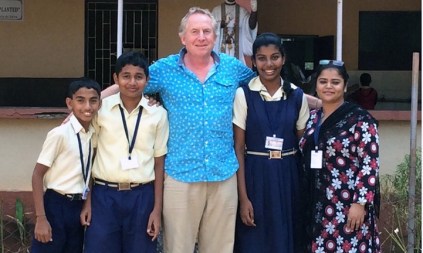
Last year, Phil’s visit supported the launch of our school blogs and kick started Skype Classroom projects. This year, he set out to make a multi-touch book on a single iPad and create a collaborative text about the two localities. My first attempt at creating a teacher authored textbook using iBooksAuthor came about at the Apple Distinguished Educator (ADE) institute in San Diego (2014), and with a group of Early Years ADEs we authored a book about Rancho Cuyamaca. I shared this project with Phil and it shaped our vision for this project.
Start Unplugged! Coding in Early Years.
This Spring Term I was invited to work with staff at Heymann School, Nottinghamshire, who were preparing for Science Technology project. My role was to share and support in ways their early years pupils could engage with coding and control skills.

I champion a place for unplugged computing in the curriculum as it secures language, vocabulary, children’s internal decision making, recording and visualising their own inner-computing.
To read more about computational thinking, coding and how it supports you to plan for The Characteristics of Effective Learning and thinking skills, you can also read this more recent post of mine.
Enhancing Practical Maths with Math Journals and MyStory app.
I have been reading Kristi Meeuwse’s blog, iTeachWithiPads, for a while now and a recent post of hers on Maths Journals stood out for me. I am always asked about maths apps for iPads, but I have never considered myself a maths expert. What I usually see are maths games being played on the iPad, which can engage certain leaners but the level of enhancement is not as great as what I have seen with literacy and authoring apps. The work Kristi’s kindergartener’s engage with on iPad is the best example of maths enhancement with technology that I have seen.
What are Maths Journals?
We use MyStory book creating app to photograph practical maths activities and record our maths understanding with marks or voice on the pages of the book. This means that the practical activity is captured, making the experience more meaningful rather than disposable play that is packed away at tidy up time. The child can reflect further on their learning by recording their mathematical understanding using the built-in microphone or with physical marks on the page.

Enhance Early Understanding of Shape with iPad and Animation Apps
Animating with iStopMotion
iStopMotion brings stop frame animation to early years for the first time. The app allows the children to see their last taken frame on top of the live view of the next image they need to take. This shows them where to place the object they are animating for the next shot. This feature is known as an onion skin. Here is an example of this feature from teachwithvideo.com.

At first glance, this app lends itself perfectly to story telling, language and literacy. This year though, I had an opportunity to enhance shape, space and measure with iStopMotion.
Apps to use – click the app names to take you to the AppStore
Free: iMotion – this app does not have an ‘onion skin’ feature.
Paid (lower price point ): iCanAnimate – this app does have ‘onion skin’ but does not record sound/voice of the animation
Paid (higher price point): iStopMotion – this app has both ‘onion skin’ and sound/voice record.
Enhance Early Understanding of Shape with iPad and Padlet
Shape Hunting around School.
This adult led activity happens in so many foundation classes, and I have led shape walks many times. During these walks, we carry a bag of plastic shapes, and we match the plastic pieces to real objects. This happens for 2D and 3D shapes. The children might even mark off on a clipboard the shapes they spotted, like bingo, or draw pictures of the shapes they have seen. By the end of the walk, they have all recorded the same shapes in the same places. I wanted to enhance this experience, to make it more collaborative. To do this I used Padlet.

Paperless Assessment in Early Years: apps and ideas to consider.
This time last year we discussed a move towards using an assessment app in our Foundation 2 Unit. Up until September 2013 I had always gathered my photographic evidence using a digital camera and organised them easily using iTag software. I wrote a post about this a few years back here. So much has changed with the way photographs and cameras are used in Foundation settings since that, so here is an update.
Using ICT has always reduced the time it takes me to organise my assessments and by having a note taking and photo gathering app, which creates a learning journey, the time it takes us to file has been reduced considerably. Our workflow has also been significantly streamlined as observations no longer need to be collected and then manually filed in date order. You cannot deny it is much easier to put your finger on ‘that piece of evidence’ when 30 learning journeys are on one iPad screen!
Genius Hour in Foundation.
This year we want to develop our project and research skills with our children. We want to offer our children learning opportunities beyond what the curriculum suggests. We want to give them enrichment opportunities which promote a thirst for learning and a chance to find out more about something they are passionate about.
Our second week using iPads in Foundation – Let’s be published authors!
Creating content on our iPads is an important part of our new computing curriculum and it begins in the foundation stage. The app I introduced was My Story and the skill was to import photographs on to pages.
Last week we worked on the basics on the iPads- switching them on/off, handling them safely, making videos and taking photographs. These basics are still being covered as part of our review each time we start working on the iPads.
Our first week using iPads in Foundation – mastering the basics!
I have had just over a week settling our new Foundation 2 children in to school. As well as the usual rules and routines of a new setting, I have introduced them to iPads and how they can be used at school.
Some children are more confident than others, which challenges the perception that “the kids already know how to use them” and “they will end up teaching you to use them”. Some of the children didn’t know how to turn them on and off, and most children have had to learn new vocabulary involved with using the iPads (sleep/wake button, home button, home screen). This language was introduced as we were using the iPads, as well as correct ways to hold and carry them around school; “two hands, fingers on the back, thumbs on the front”.
 Enabling Environments