Including Early Years and ELGs in a computing curriculum (UPDATED September 2014)

The autumn term has been a long but rewarding one for me. A new job has been the challenge that I was looking for and I am settled in to a new school and a new role. Each week has passed with a new set of achievements and the role has been fast paced, but progress is being made at an astonishing rate!

One focus for me, as for many of us, is implementing a new computing curriculum for the school. As an early years teacher I am keen to include the foundation stage within the primary curriculum planning phase and make stronger links between the two curriculums.

This may be an easier process for other curriculum areas, but within the ‘technology’ strand in Early Years Outcomes and the new computing curriculum for key stage 1, it seems to be a little more vague.

Continue reading

Changing Schools. Changing Visions. Changing Spaces [updated]

Changing Schools.

On Tuesday I will start work at my new school. This is the first move I have made since graduating 3 years ago, so I’m looking forward to that exciting new start again. I recently saw a letter from the school listing the teaching staff and I was referred to as an experienced teacher. At my last school I sometimes felt like the ‘new kid’ as I started as an NQT and the only one that stayed on as permanent member of staff. I’m pleased to be moving forward and progressing but I still feel like I have so much to learn before I am ‘experienced’. I guess that’s one of the reasons I wanted to come in to teaching in the first place, we are always learning.

Continue reading

Programming Apps for Early Years and Key Stage 1

This has been a busy week to say the least! Not only am I preparing to move schools, I have been at 3 CPD events in two days and the new primary curriculum has been released (almost).

The 3 events were Computing at Schools (NTU Hub), TeachMeet Nottingham and The Festival of Innovation. At all 3 events I was involved in running workshops, but it was good to spend time listening to others and finding about about computing and programming. My good friend Peter Bevington (@PeteBevington) has great ideas for a new primary curriculum which he has already started embedding so do get in touch with him for your long term ICT plans!

Meeting other teachers is also great and that’s how I pick up new ideas. So here’s my favourite three Apps for programming on the iPad (the 4th being BeeBot which we all know and love). By the way, these are all FREE on AppStore!

Continue reading

The Festival of Innovation

Friday 12th July was Nottinghamshire’s Festival of Innovation and I was invited to run four 45 minute workshops. The whole event had such a good feeling about it, and it was attended by teachers, ICT leaders and head teachers. A real good mix of people all wanting to learn something new and look for innovative ideas.

The Keynote came from John Davitt @JohnDavitt who was very entertaining. His presentation was very interactive with a jargon busting bingo card and many jokes along the way. I’d love to summarise what he talked about but it ranges from accents, hyperlinks, talking sheep and using QuickTime and buttering toast. What he did do though, which is a refreshing to see, is encourage the use of Twitter during the event so that we can all share ideas during the day. As so few teachers are using Twitter, John directed us to http://www.todaysmeet.com which sets up a private timeline on their site for participants to post to without having an account. Take a look at it for your next event! Also check out his website and follow him on twitter.

Ok… On to my workshops.

Continue reading

Using Puppet Pals beyond story telling.

I have always been a fan of the Puppet Pals and it was one of the first apps I came across when my journey with iPad began. At BETT 2013 I worked with Ian Wilson ADE again and we had a lot of time to chat about new apps. During the week the Puppet Pals 2 app was released and that was one of the apps we talked about. This addition to the Puppet Pals series makes further use of animation and has some very cool characters which interact with other objects on the set… But we agreed that the simple charm of the original app was what we liked. I have always enjoyed putting in my own characters straight from books, and Ian talked about using the app beyond the obvious story telling purpose.

He explained how he has used Puppet Pals to discuss physics, moving objects (put in as characters) around a plain white background and recording the conversation in the app. Straight away I thought this was a great idea and I knew that when the opportunity came for me to adapt this to an early years context I would pull it out of my bag of tricks…

And the time came to use it…

Continue reading

Transformation in Education: Can iPad help to transform learning?

This has been a very busy half term, as it always is at the end of the year, so I feel that I have neglected my blog. It’s time to update you on what I’ve been doing and how my thinking has been enhanced by the people I’ve been working with recently.
I am very lucky to have a headteacher who values my continual professional development and allows me to work at, and attend, ICT conferences on a regular basis. This half term I feel like I’ve been on tour. I’ve spoken at several events in various counties about iPad and it’s potential in Early Years and Primary education. Bedfordshire, Birmingham, Derbyshire and Nottinghamshire have welcomed me to their events and the feedback I’ve had has been overwhelming.
At an ICT Subject Leaders conference I had the chance to listen to Craig Wilkie who speaks passionately about Transformation in Education. I really valued his honesty, and almost his vulnerability, in promoting this thinking in schools (Transformation sounds like a big deal, and a scary concept!) However, as his presentation went on, I realised that my school and other settings I have worked with are transforming the learning culture.
Wilkie provoked discussion on ICT and how it is playing a part in transforming learning but ICT is only ‘one spoke of the bicycle wheel’. He wanted me to unpick the steps to transforming my classroom and gave me 3 labels to place in order along a line: “Transformation” “Replacement” “Enhancement”.

Continue reading

Technology in the new Early Years Foundation Stage: What do you need to prepare?

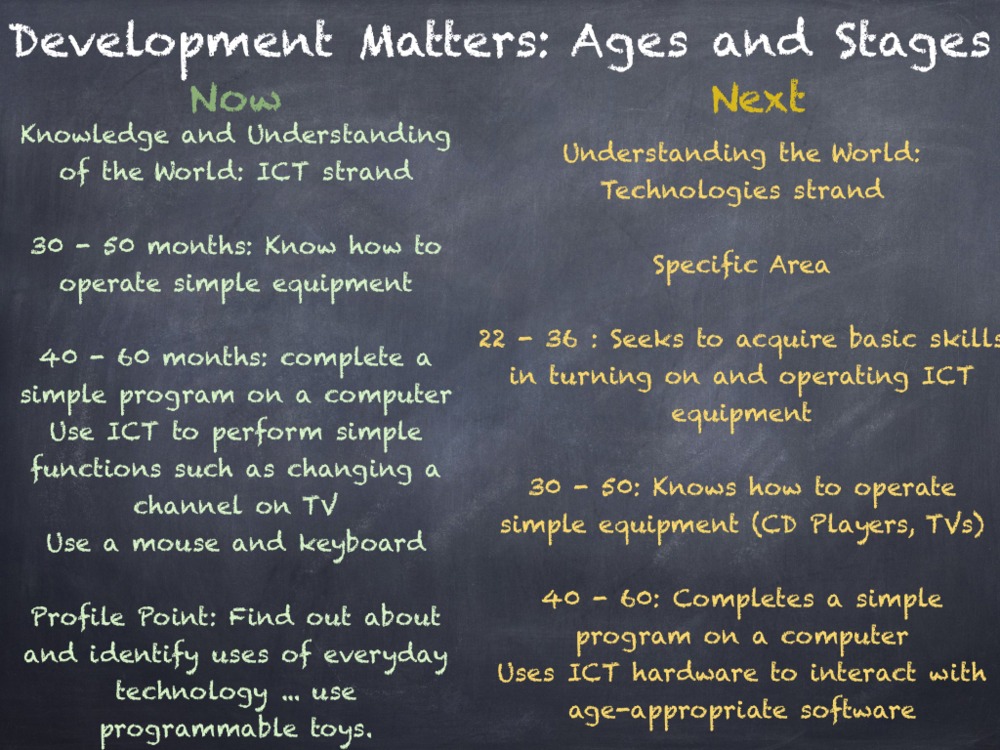
The new EYFS is on the way in September and the Development Matters document is bringing exciting changes across all of areas of learning, but for me, the greatest acknowledgement is in the Technology strand of ‘Understanding the World’.
 
During the Summer Term I have been working in a variety of counties discussing my use of iPad and how I believe this tool has a strong place within the new Technologies strand.So what is happening in Development Matters?
photo_1_1-png-scaled-1000
photo_2_1-png-scaled-1000
photo_3_1-png-scaled-1000
photo_4-png-scaled-1000
Creating Content
  
It seems that the use of a BeeBot, or other programmable toys, is now part of a much wider vision for ICT learning and assessment. The emphasis on using technology in the new curriculum is on children creating their own content. This content creation is embedded in the other areas of learning, using technology to enhance communication, language, arts, maths and literacy. Therefore, the skills of the specific area of learning ‘Understanding the World’ can be practised through prime area strands such as speaking, listening and social development.
 
By using an app like Puppet Pals, children are creating and saving their own content on iPad but are also working in a group, taking turns and talking about the story they are retelling.
Age Approriate Software and Hardware
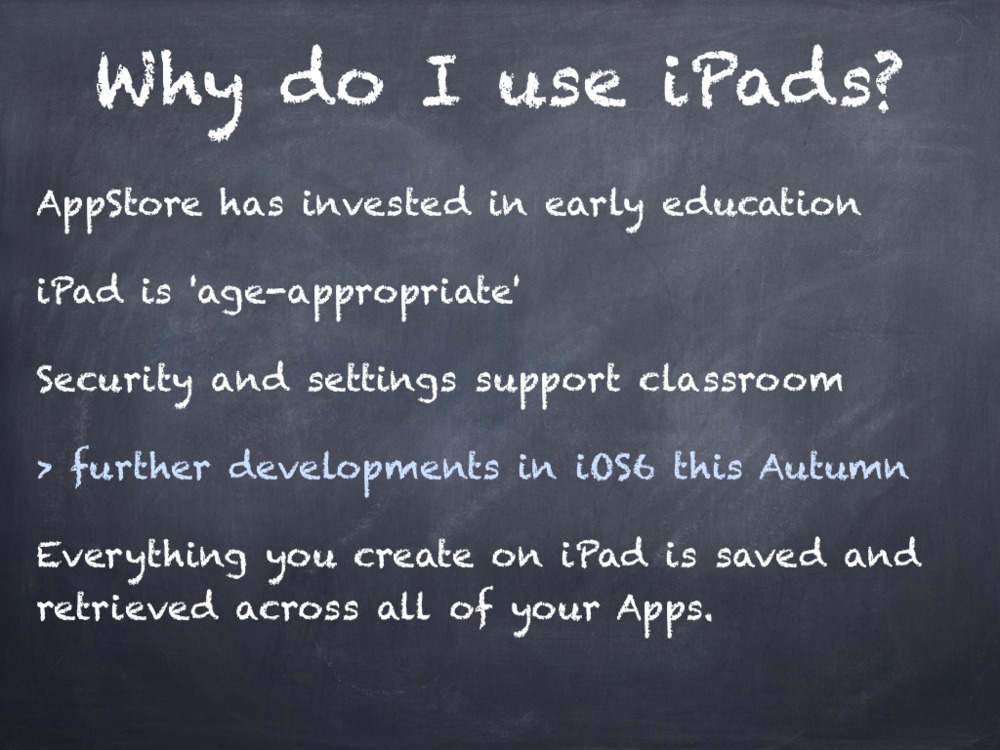
The new strand also mentions the need for selecting age appropriate ICT devices. Many settings and schools use NetBooks, PCs and/or ICT Suites but more settings are turning to mobile devices as age-appropriate solutions. The iPad is an age appropriate device as it promotes sharing and group work as several children can work around one device. It’s touch screen access means that children interact directly with the software and they are learning how to get a response from an animation or display on screen by touching exactly what they want. The fewer transition points in an activity, the faster the pace of learning. With a mouse or keyboard, children need to look down at them and then back up at the screen, this can cause some confusion depending on the task! They do need to learn these skills, but we need to be selective in when this is appropriate to the task at hand. What do we want the children to do when learning a story? I want them to retell the story. How am I going to do? Story maps, story walks, role play masks and costumes, small world play and now, Puppet Pals App can retell the story digitally. My proudest moment came from this app this year, where 3 children retold The Gruffalo using this App, a skill I was waiting to see from them.
iPad, compared to other tablets and devices, looks age appropriate in the layout and organisation. iPad doesn’t have any menus, minimising features, exit crosses, dates, times, calendars etc on the home screen. Therefore children look for the software they want using the large icons. 
The security settings also allow children to access the apps which are appropriate to them, and apps like a web browser, AppStore, iTunes can be disabled for classroom use. The latest version of iOS brings Guided Access in the Accessibility settings. This means that in an early years setting, the teacher can set Guided Access so that one particular app is used in that session, and at other times can have free choice of what apps to use. 
Final Thoughts

The new technologies strand is still very limited in what you are assessing, and this is probably is probably due to the digital divide between settings and homes. With an upcoming review of the National Curriculum, it may be useful to look at skills that can be taught in Year 1 and bring these in to planning for the foundation stage too.

Download Now:

Enabling_Environments_Curriculum.600x600-75Enabling Environments: A Computing Curriculum Beginning in Early Years

This book has been written for the Early Years practitioner or Computing Coordinator of a school looking to further embed the use of technology in their Foundation 1 and Foundation 2 settings. Marc Faulder, an Early Years teacher and Apple Distinguished Educator, provides a complete skills curriculum from 30 months to the Early Learning Goal in this book. Chapters introduce a skills curriculum, the assessment and progression of the skills and a thorough planning document to show how technology enhances learning in all Early Learning Goals.

Download_on_iBooks_Badge_US-UK_110x40_090513

How to organise apps and set restrictions for a primary or early years iPad

Please note that images on this blog reflect iOS 5, however the processes remain the same.

For the Summer Term I am planning to support staff at the primary school I work at with understanding the basics of using an iPad in a primary classroom. This blog post is going to act as a base for all of my advice, so it will probably change over the coming weeks.

For information on managing multiple devices and purchasing app licenses, see my blog post here: https://enablingenvironments.wordpress.com/wp-admin/post.php?post=728&action=edit

I saw a blog post at EdTechLoung.com this Easter holiday which gave a huge bank of recommended Apps for Early Years and Primary Education. The blog post also provided information on how to group these Apps into folders to make the iPad more accessible for primary aged pupils. This reminded me of a very early blog post I wrote when I first launched ‘Enabling Environments’. I shared the challenges and solutions to using 1 iPad in a class of 30 children, and now I feel I have so much more to say about it. If you want to read about deploying multiple iPads in a classroom or school, read this blog post about the Volume Purchase Program and mobile device management.

Continue reading

PhotoBooth and Inclusion in Art.

When working with the staff at Tiny Tots Day Nursery over the Easter Holiday, one of the themes we investigated was how staff working with under 2s could use iPad with their children. We started by talking about what under 2s enjoy and what the staff already provide that is good quality first experiences. This lead the discussion to think about how iPad can be integrated in to a multi-sensory activity with elements of investigation.

Continue reading

Bringing Stories to Life with iPad

At TeachMeet Nottingham, Friday 30th March, I spoke about my work with Apps Based Learning on iPad and how Puppet Pals and Morpho Booth has been effective in bringing story language to life in my Reception class.

Earlier in the Spring Term 2012, I wrote about the iPad Workshop which I organised at my school with the support of European Electronique (@euroele) and Neil Emery (@neilemerydotcom). Since then I have been busy planning and resourcing opportunities for my Reception class to make the best use of apps in the classroom.

Continue reading