A theory about outdoor education from The Simpsons #ukedchat

I have watched this episode of The Simpsons many times and always wanted to do something with it.

It gives me a lot to think about, and I know that I have a lot of work to do to improve my outdoor opportunities. Sometimes I don’t always feel confident with the open ended nature of learning outside, I don’t always know how to plan it and how to explain it to others. Sometimes we are not prepared for weather with the right clothes and I know that is always the best times to be outside (puddles, mud, snow). Sometimes I’m not always prepared to take the risks involved in climbing, building etc.

Continue reading

Using Puppet Pals beyond story telling.

I have always been a fan of the Puppet Pals and it was one of the first apps I came across when my journey with iPad began. At BETT 2013 I worked with Ian Wilson ADE again and we had a lot of time to chat about new apps. During the week the Puppet Pals 2 app was released and that was one of the apps we talked about. This addition to the Puppet Pals series makes further use of animation and has some very cool characters which interact with other objects on the set… But we agreed that the simple charm of the original app was what we liked. I have always enjoyed putting in my own characters straight from books, and Ian talked about using the app beyond the obvious story telling purpose.

He explained how he has used Puppet Pals to discuss physics, moving objects (put in as characters) around a plain white background and recording the conversation in the app. Straight away I thought this was a great idea and I knew that when the opportunity came for me to adapt this to an early years context I would pull it out of my bag of tricks…

And the time came to use it…

Continue reading

Technology in the new Early Years Foundation Stage: What do you need to prepare?

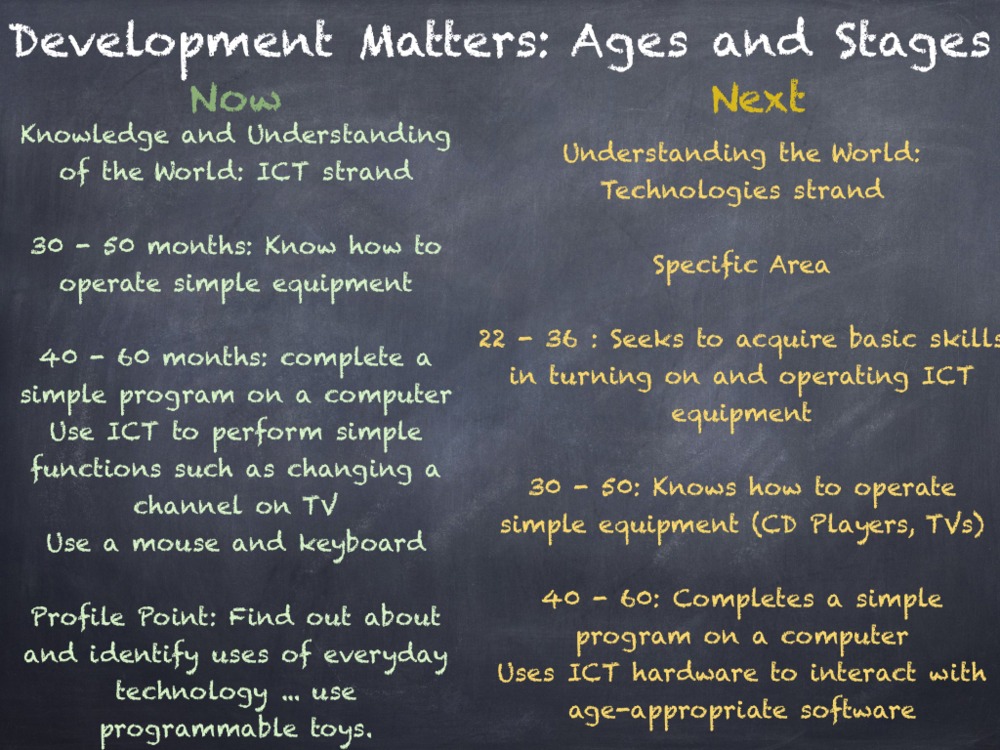
The new EYFS is on the way in September and the Development Matters document is bringing exciting changes across all of areas of learning, but for me, the greatest acknowledgement is in the Technology strand of ‘Understanding the World’.
 
During the Summer Term I have been working in a variety of counties discussing my use of iPad and how I believe this tool has a strong place within the new Technologies strand.So what is happening in Development Matters?
photo_1_1-png-scaled-1000
photo_2_1-png-scaled-1000
photo_3_1-png-scaled-1000
photo_4-png-scaled-1000
Creating Content
  
It seems that the use of a BeeBot, or other programmable toys, is now part of a much wider vision for ICT learning and assessment. The emphasis on using technology in the new curriculum is on children creating their own content. This content creation is embedded in the other areas of learning, using technology to enhance communication, language, arts, maths and literacy. Therefore, the skills of the specific area of learning ‘Understanding the World’ can be practised through prime area strands such as speaking, listening and social development.
 
By using an app like Puppet Pals, children are creating and saving their own content on iPad but are also working in a group, taking turns and talking about the story they are retelling.
Age Approriate Software and Hardware
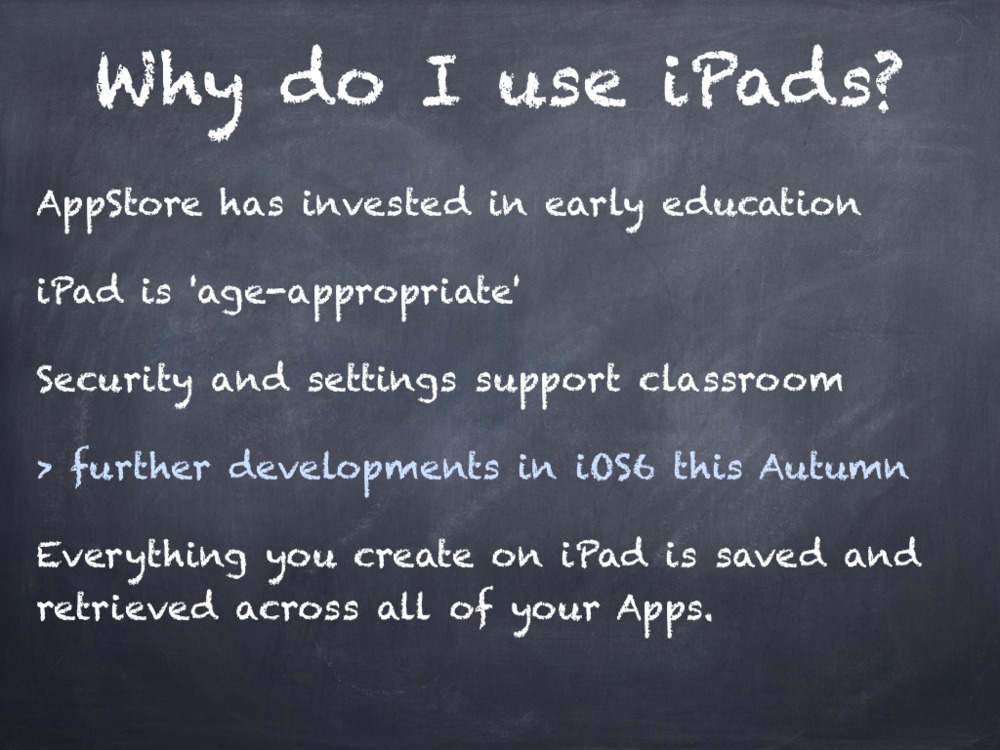
The new strand also mentions the need for selecting age appropriate ICT devices. Many settings and schools use NetBooks, PCs and/or ICT Suites but more settings are turning to mobile devices as age-appropriate solutions. The iPad is an age appropriate device as it promotes sharing and group work as several children can work around one device. It’s touch screen access means that children interact directly with the software and they are learning how to get a response from an animation or display on screen by touching exactly what they want. The fewer transition points in an activity, the faster the pace of learning. With a mouse or keyboard, children need to look down at them and then back up at the screen, this can cause some confusion depending on the task! They do need to learn these skills, but we need to be selective in when this is appropriate to the task at hand. What do we want the children to do when learning a story? I want them to retell the story. How am I going to do? Story maps, story walks, role play masks and costumes, small world play and now, Puppet Pals App can retell the story digitally. My proudest moment came from this app this year, where 3 children retold The Gruffalo using this App, a skill I was waiting to see from them.
iPad, compared to other tablets and devices, looks age appropriate in the layout and organisation. iPad doesn’t have any menus, minimising features, exit crosses, dates, times, calendars etc on the home screen. Therefore children look for the software they want using the large icons. 
The security settings also allow children to access the apps which are appropriate to them, and apps like a web browser, AppStore, iTunes can be disabled for classroom use. The latest version of iOS brings Guided Access in the Accessibility settings. This means that in an early years setting, the teacher can set Guided Access so that one particular app is used in that session, and at other times can have free choice of what apps to use. 
Final Thoughts

The new technologies strand is still very limited in what you are assessing, and this is probably is probably due to the digital divide between settings and homes. With an upcoming review of the National Curriculum, it may be useful to look at skills that can be taught in Year 1 and bring these in to planning for the foundation stage too.

Download Now:

Enabling_Environments_Curriculum.600x600-75Enabling Environments: A Computing Curriculum Beginning in Early Years

This book has been written for the Early Years practitioner or Computing Coordinator of a school looking to further embed the use of technology in their Foundation 1 and Foundation 2 settings. Marc Faulder, an Early Years teacher and Apple Distinguished Educator, provides a complete skills curriculum from 30 months to the Early Learning Goal in this book. Chapters introduce a skills curriculum, the assessment and progression of the skills and a thorough planning document to show how technology enhances learning in all Early Learning Goals.

Download_on_iBooks_Badge_US-UK_110x40_090513

How to organise apps and set restrictions for a primary or early years iPad

Please note that images on this blog reflect iOS 5, however the processes remain the same.

For the Summer Term I am planning to support staff at the primary school I work at with understanding the basics of using an iPad in a primary classroom. This blog post is going to act as a base for all of my advice, so it will probably change over the coming weeks.

For information on managing multiple devices and purchasing app licenses, see my blog post here: https://enablingenvironments.wordpress.com/wp-admin/post.php?post=728&action=edit

I saw a blog post at EdTechLoung.com this Easter holiday which gave a huge bank of recommended Apps for Early Years and Primary Education. The blog post also provided information on how to group these Apps into folders to make the iPad more accessible for primary aged pupils. This reminded me of a very early blog post I wrote when I first launched ‘Enabling Environments’. I shared the challenges and solutions to using 1 iPad in a class of 30 children, and now I feel I have so much more to say about it. If you want to read about deploying multiple iPads in a classroom or school, read this blog post about the Volume Purchase Program and mobile device management.

Continue reading

PhotoBooth and Inclusion in Art.

When working with the staff at Tiny Tots Day Nursery over the Easter Holiday, one of the themes we investigated was how staff working with under 2s could use iPad with their children. We started by talking about what under 2s enjoy and what the staff already provide that is good quality first experiences. This lead the discussion to think about how iPad can be integrated in to a multi-sensory activity with elements of investigation.

Continue reading

Bringing Stories to Life with iPad

At TeachMeet Nottingham, Friday 30th March, I spoke about my work with Apps Based Learning on iPad and how Puppet Pals and Morpho Booth has been effective in bringing story language to life in my Reception class.

Earlier in the Spring Term 2012, I wrote about the iPad Workshop which I organised at my school with the support of European Electronique (@euroele) and Neil Emery (@neilemerydotcom). Since then I have been busy planning and resourcing opportunities for my Reception class to make the best use of apps in the classroom.

Continue reading

iPad Apps for Early Years: a few ideas to get you started.

 Staple Apps for your iPad

My Story

This app is a simple book creator app and is great for making multi-modal texts. Children can insert photographs, clipart, saved images. They can also record their voice and there are a range of mark making tools for them to write and record their ideas. Read more about introducing My Story on this post here.

Puppet Pals

p445-scaled1000

This is a puppet show app and children can quickly create a story with characters and backgrounds in 3 simple steps. The app records their voice and playback is instant. Puppet shows export as videos to the iPad’s camera roll.

Here is a good YouTube video which demonstrates the Puppet Pals App
Here is an example of children’s work from my class:

Puppet Pals is so versatile and can be used beyond story telling. It can support non-fiction, instruction texts, science and mathematics. Find out more about using Puppet Pals beyond story telling here.

Continue reading

Jan Dubiel’s Lecture "A New Landscape? Exploring the Implications of the Early Years Review

GE DIGITAL CAMERA

On Saturday 10th March, the same day as the NAACE TeachMeet in Leicester, Derbyshire County Council also held a big event for their Derbyshire Early Years settings at the University of Derby. I was lucky enough to be invited to attend this with Tiny Tots Day Nursery to showcase a range of ICT equipment and demonstrate the appropriateness of Games Based Learning in Early Years settings. This blog post is one of two, here I will reflect on the Keynote Lecture given by Jan Dubiel which focuses on Curriculum change in Early Years. My second blog will provide links and advice based on the discusses I had with visitors to the workshop I featured in.

Continue reading

Project Based Learning using X Box Kinect.

I began my journey in to games based learning about a year ago, and I often get asked “how does it work?”. I still don’t have a clear answer, but I do have interesting stories to tell about children’s interactions with games in the classroom.

I have recently partnered with European Electronique (@euroele) who are an ICT solutions company with an interest in promoting games based learning. This partnership has helped to define my ideas about games based learning, so this blog post offers another perspective on what games based learning could be.

In my previous post on games learning with the Kinect in a Foundation Stage setting I spoke about organising game play in smaller group situations and engaging children in activities related to game play. This idea remains the most effect use of gaming with children.

Continue reading